
Pixa (Pixelcut): AI images for small teams
Some links on this page are affiliate links. If you sign up through one, we may earn a commission. It costs you nothing. Learn more.
Pixa (Pixelcut) helps you create and edit images by this route: aI product photos, background removal and short videos, from the team behind Pixelcut. It is best for online sellers and small brands that need clean product photos, lifestyle shots and short promo videos without a studio. People also use it to make and edit video.

What it does
Pixelcut describes itself as an AI video and image platform for sellers. It removes backgrounds from images and video, upscales images up to 16x, generates product showcase shots and lifestyle scenes from a prompt, and makes AI UGC-style talking videos. Its Creative Agent plans and runs tasks for you with third-party models such as Nano Banana Pro and Sora 2. Paid plans use monthly AI credits; Pixelcut’s pricing page lists how many images or videos each model can make per plan. Pixa’s help site currently redirects to Pixelcut’s help center.
Official site:www.pixa.com.
Editorial note
Pixa is the new home the Pixelcut team is building for its AI image and video tools. Today pixa.com shows a “Something new is coming” page that points photo-editor users to Pixelcut.ai, where the editor and plans live: a Free plan, Pro at $10 a month and Business at $30 a month.
Who it’s for
- For: Online sellers and small brands that need clean product photos, lifestyle shots and short promo videos without a studio.
- Not ideal for: people who want a full photo-editing suite with layers and manual retouching.
Key use cases
- Images & product photos
- Video & avatars
What you can do with it
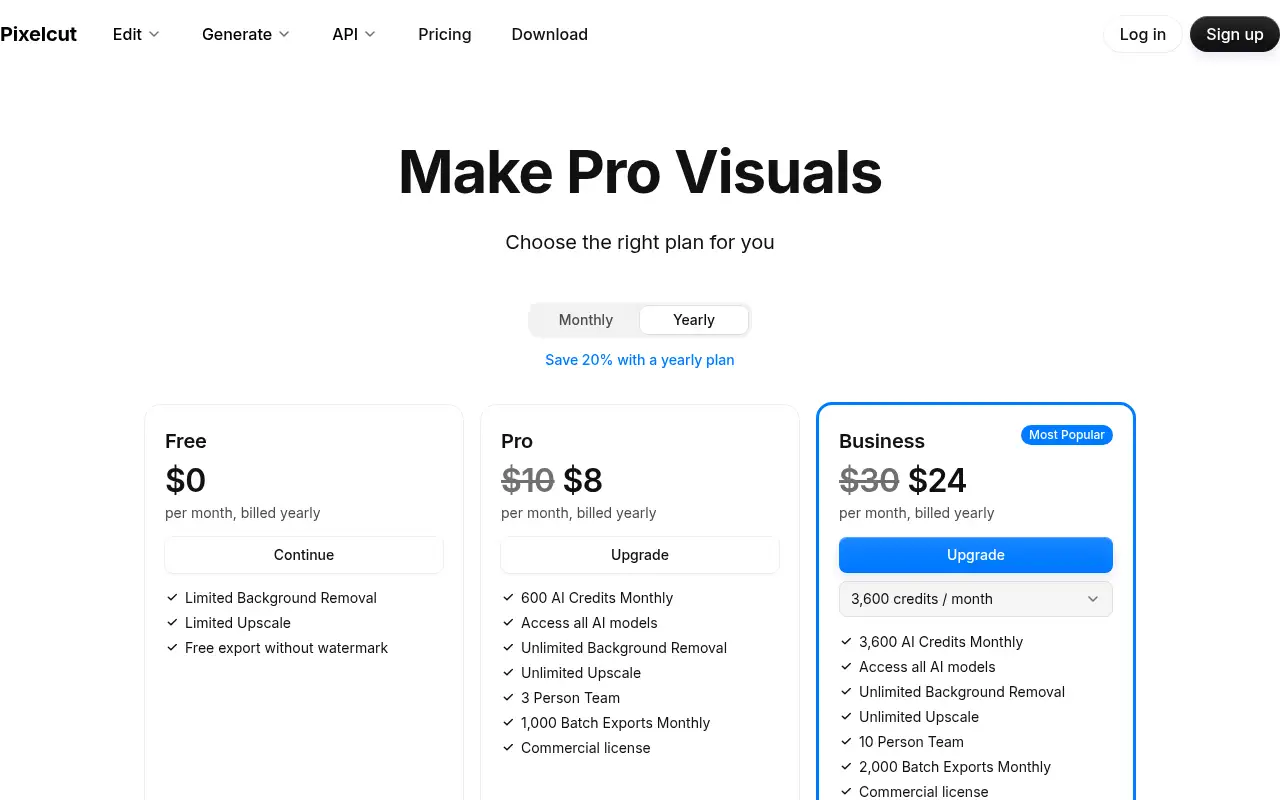
- Free access: Pixelcut’s pricing page lists a Free plan at $0 with limited background removal, limited upscaling and free exports without a watermark. This matters when you want to test before you pay.
- Pro plan: 600 AI credits a month, all AI models, unlimited background removal and upscaling, 3-person team, 1,000 batch exports a month, commercial license. This matters when the free tier is not enough.
- Business plan: 3,600 AI credits a month, all AI models, 10-person team, 2,000 batch exports a month, commercial license. This matters when the free tier is not enough.
- Help documentation: Official pricing and product pages at www.pixa.com. This matters when you set it up yourself.

How to use Pixa (Pixelcut): step-by-step tutorial
Five to eight steps from the account to a first useful result. Where the official guide names a control, the step uses that name. Where it does not, the step stays general.
- Go to pixa.com and follow the link to Pixelcut.ai, then sign up for the Free plan.
- Upload a product photo taken on any plain surface.
- Run background removal to cut the product out.
- Pick an AI background or describe a scene in a prompt to place the product in it.
- Upscale if you need a larger file, then export; the Free plan exports without a watermark, per Pixelcut.
These steps follow the official guide: Pixelcut pricing.
Example inputs
Adapt these. They are examples of what to ask for, not a button name, unless the steps above already use that name.
A first request: aI product photos, background removal and short videos, from the team behind Pixelcut. Keep it short enough to review in one pass.Name the audience, the format you need, and one fact that must stay accurate.Frequently asked questions
Is Pixa the same as Pixelcut?
pixa.com currently shows a holding page that sends photo-editor users to Pixelcut.ai, and help.pixa.com redirects to Pixelcut’s help center, checked October 26, 2026. The editor and plans are on Pixelcut.ai for now.
Is Pixa free?
Yes. Pixelcut’s pricing page lists a Free plan at $0 with limited background removal and upscaling and exports without a watermark, checked October 26, 2026.
How much does Pixa cost?
Pro is $10 a month, or $8 a month billed yearly; Business is $30 a month, or $24 a month billed yearly, per Pixelcut’s pricing page.
What are AI credits used for?
Pixelcut says credits are used when you create or edit with certain advanced AI models, especially third-party ones. Pro includes 600 credits a month and Business 3,600.
Do prices differ on iPhone, Android and web?
Pixelcut’s help center says prices can vary between iOS, Android and web, and a purchase on one platform gives access on all of them when you log in with the same account.
Pricing
Prices checked on the official pricing page.
- Free
-
$0
Limited background removal and upscaling; free export without watermark
- Pro
-
$10/month, or $8/month billed yearly
600 AI credits a month, all AI models, unlimited background removal and upscaling, 3-person team, 1,000 batch exports a month, commercial license
- Business
-
$30/month, or $24/month billed yearly
3,600 AI credits a month, all AI models, 10-person team, 2,000 batch exports a month, commercial license
- Limits: Free plan limits background removal and upscaling; advanced AI models use monthly credits. pixa.com itself is a holding page as of October 26, 2026.
- Plans change: vendors update limits and prices; confirm on the official page before you buy.
Facts
- Access
- Ongoing free plan
- Paid plans from
- $0
- Checked
- Category
- Category: Images and design tools (47 in the library).
- On the record
- Pixelcut’s pricing page lists a Free plan at $0 with limited background removal, limited upscaling and free exports without a watermark.