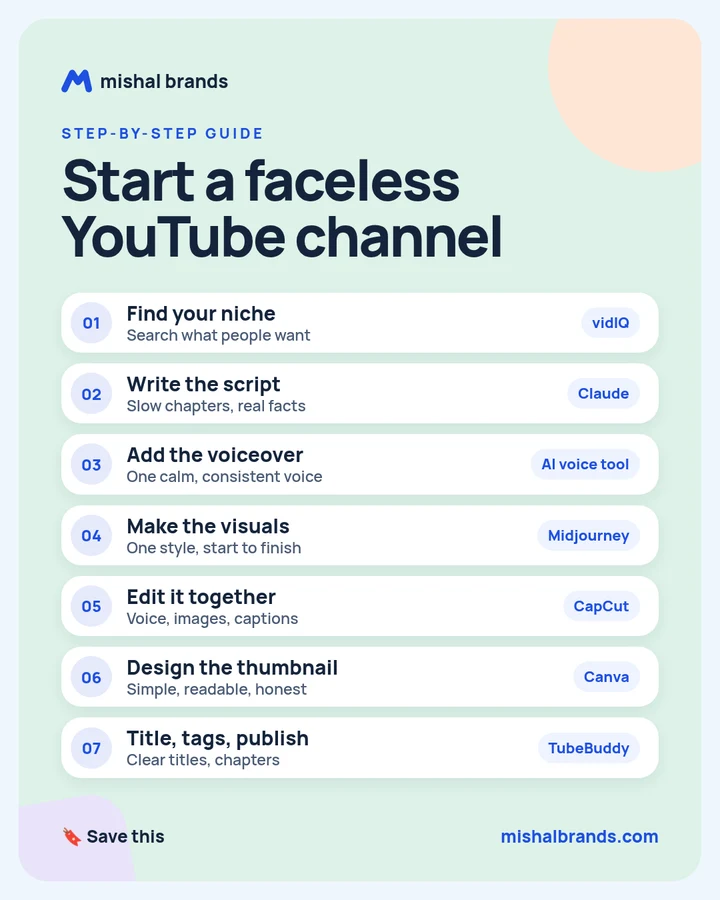
Start a faceless YouTube channel: step-by-step guide
Pick one calm niche, script slow chapters with AI, add one consistent AI voice, make visuals in one style, edit it together, design an honest thumbnail, then publish with clear titles and chapters. Expect real oversight time, and check YouTube’s monetization rules before you apply.
Updated· By Mishal Brands Editorial
What did Fortune report?
Fortune reports that Adavia Davis, 22, makes roughly $40,000 to $60,000 a month from a network of faceless YouTube channels. His most lucrative is a “Boring History” channel of long “history to sleep to” videos. Those are his own figures. Fortune says it reviewed screenshots of his analytics dashboards and recent AdSense payout records. Fortune also reports he told it the channels take about two hours of oversight a day.
Suggested workflow, not his exact stack. Fortune reports Davis uses Claude for scripts and visuals, ElevenLabs for narration, and a proprietary pipeline for the rest. The 7 steps below are a workflow one person can run with off-the-shelf tools. Results vary.
Save the cheat sheet. The full steps are below.
What are the 7 steps?
STEP 1 · vidIQ
Find your niche
What to do
Pick one calm, evergreen topic people already search for, and keep the whole channel on it. vidIQ’s site says it offers keyword research with search volume and competition scores, plus trending topics and outlier videos in your niche, and that it is free to start.
Write down 3 topics you could make 30 videos about.
Look each one up in vidIQ’s keyword research and note search volume and competition.
Pick the topic with steady demand and room for a new channel. Use the list below if you need a starting point.
Example
Niche ideas that suit long, slow, faceless videos: history to sleep to, calm space facts, deep-sea life, myths retold. There are 20 more in the niche list.
Niche shortlist prompt (any chat AI)
I want to start a faceless, long-form YouTube channel with calm narration. My candidate topics: [topic 1], [topic 2], [topic 3]. For each, give: who watches it and when (for example at bedtime), 10 specific video ideas, whether I could publish 30 videos without repeating myself, and what visuals would work with no face on screen. Then recommend one topic in 3 sentences.
Ask for slow, chaptered scripts built on well-documented facts, written in second person. Fortune reports that Davis’s scripts are generated with Claude. Read every script, check the facts, and add your own research and angle. YouTube’s monetization policies exclude mass-produced, repetitive content.
Example
Sample opening line: “You wake before dawn in a stone cottage in 1348. The fire has gone out, and the village is quiet.”
Pick one calm voice and keep it on every video, so the channel sounds the same from week to week. Generate the audio chapter by chapter, listen back, and regenerate any line that sounds off. Fortune reports that Davis’s narration comes from ElevenLabs. ElevenLabs’ pricing page lists a free plan with 10k credits a month, and says Starter adds a commercial license. Check the license before you monetize.
This is an affiliate link. If you sign up through it, we may earn a commission. It costs you nothing. Learn more
Example
Voice tips: choose a low, unhurried voice. Keep sentences short so the pacing stays slow. Add a short pause between chapters in the editor rather than in the script.
Choose one visual style and use it from start to finish: still or slow scenes that match each chapter. Save the style words you use and paste them into every prompt so the images look like one video.
Example
Image prompt pattern
[scene from the chapter], soft oil-painting style, muted earth tones, warm candlelight, wide shot, calm and quiet mood, no text
Swap only the scene. Keep the style words the same for the whole channel.
Line up the voiceover, images and captions on one timeline. CapCut’s site lists auto captions, caption templates and noise reduction, and says you can edit online, on desktop or on mobile, with a free online version and no credit card required.
Drop in the voiceover first, chapter by chapter.
Place one image per paragraph, with a slow zoom or pan.
Add auto captions and check them against the script.
Add gentle fades between chapters and keep music quiet under the voice.
Example
Pacing example: for a sleep-history video, hold each image for 8 to 15 seconds, so nothing on screen jolts the viewer.
Write a clear title, add chapter timestamps, set tags, then publish. TubeBuddy’s site lists SEO tools (Keyword Explorer, SEO Studio), a title generator, a thumbnail analyzer, a chapter editor and A/B testing. When you upload, disclose AI-generated or altered content that looks realistic, as YouTube requires.
Example
Sample title: “Life in a Medieval Village | 3 Hours of History to Fall Asleep To”. Sample chapters: 00:00 Before dawn, 24:10 The market, 51:30 Harvest.
These are ideas to check in step 1, not picks with proven demand. Look each one up before you commit.
History to fall asleep to
Ancient civilizations explained
Calm space and astronomy facts
Deep-sea and ocean life
Rain and nature soundscapes with narration
Bedtime stories for adults
Study-with-me ambient sessions
Myths and legends retold
Medieval daily life
Famous shipwrecks and lost expeditions
How everyday things are made
Geography and map stories
National parks and wild places
Classic literature summaries
Philosophy for beginners
Gentle science explainers
Lives of history’s inventors
Slow world travel and city histories
Architecture and famous buildings
Animal behavior facts
Script prompt template
Fill in the brackets and paste it into Claude or any chat AI.
Script prompt template
You are writing a long-form, faceless YouTube script for the channel "[channel name]" in the niche [niche]. Topic: [video topic]. Target length: about [minutes] minutes of narration (roughly 140 words per minute).

Style: calm, slow, second person ("you"), present tense. Short sentences. No cliffhangers, no shouting, no hype.
Structure: a 60-second gentle intro, then [number] chapters with a short title each, then a quiet close.
Facts: use only well-documented facts. Mark anything uncertain with [CHECK]. After the script, list your sources for the main claims.
Original angle: include [your angle, e.g. what daily life felt like for ordinary people] so this is not a rewrite of other videos.
Also give me: 3 title options under 70 characters, chapter timestamps based on word count, and one image prompt per chapter in this style: [style words].
Pre-monetization checklist
Meet the YouTube Partner Program thresholds: 1,000 subscribers plus either 4,000 qualified watch hours in the last 12 months or 10 million qualified Shorts views in the last 90 days (YouTube Help: YPP eligibility).
Read YouTube’s channel monetization policies. YouTube has renamed its “repetitious content” policy to “inauthentic content” and says it covers content that is repetitive or mass-produced. Its reused content policy covers clips, compilations and reaction videos.
Make each video meaningfully different: new research, a new angle, and your own edit. Don’t just swap the topic in a template.
Check that you hold commercial rights to every voice, image and music track you use. For example, ElevenLabs’ pricing page says Starter adds a commercial license.
Fact-check every script and remove every [CHECK] mark before you publish.
Make sure titles and thumbnails match what the video actually delivers.
Checked against YouTube Help on Oct 24, 2026. Policies change, so read the linked pages before you apply.
The honest part
It is not passive. Davis told Fortune his channels still need about two hours of oversight a day, plus small salaried teams.
Results vary. One creator’s reported numbers are not a forecast for a new channel.
YouTube’s rules target low-effort content. The monetization policies exclude repetitive, mass-produced videos. Add real research and your own angle.
Competition is rising. Fortune reports Davis saw copycats crowd his niche after he showed his method. He expects individual creators to have until around 2027 to profit from AI long-form content.
Frequently asked questions
Can you really run a YouTube channel without showing your face?
Yes. Faceless videos use narration over images, footage or animation instead of a presenter. This guide’s workflow uses an AI voice and AI images.
How much does the Fortune story say Adavia Davis makes?
Fortune reports that Davis, 22, told it his network generates roughly $40,000 to $60,000 a month in revenue, and that Fortune reviewed screenshots of his analytics dashboards and recent AdSense payout records. Those are his figures for his channels. Results vary.
Is this exactly the tool stack Davis uses?
No. Fortune reports his scripts and visuals are generated with Claude, his narration comes from ElevenLabs, and a proprietary pipeline built by his partner automates most production. The 7 steps here are a suggested workflow for a single creator, not his exact setup.
Is it passive income?
No. Davis told Fortune his channels need about two hours of oversight a day, and he pays small salaried teams to oversee the niches.
Will YouTube monetize AI-generated videos?
YouTube’s monetization policies exclude content that is repetitive or mass-produced. Original research, a clear angle and real editing matter more than the tools.
Which step should I start with?
Step 1. A clear niche makes every later step easier, from the script prompt to the thumbnail style.
This guide is written by Mishal Brands Editorial. Tool features come from each vendor’s official site, policy points from YouTube Help, and income figures from Fortune’s reporting. We name tools as examples, and the steps are a suggested workflow. Where we are in an affiliate program, the link is marked and disclosed.
Free pack: prompts for better AI images
A short, copyable set of image prompts for product shots, portraits, thumbnails, logos, and ads. These are starting points you can adapt — not a promise of any result.