
Riverside: AI video for podcasters, creators and small businesses
Official site link, not an affiliate link. We do not have an approved referral link for Riverside.
Riverside helps you make and edit video by this route: record, edit and publish video and podcasts, now with a team of AI agents: Producer, Editor, Clipper and Marketer. It is best for podcasters, creators and small businesses who record talking-head video and want help with editing, clips and posting. People also use it to work with voice and audio.
What it does
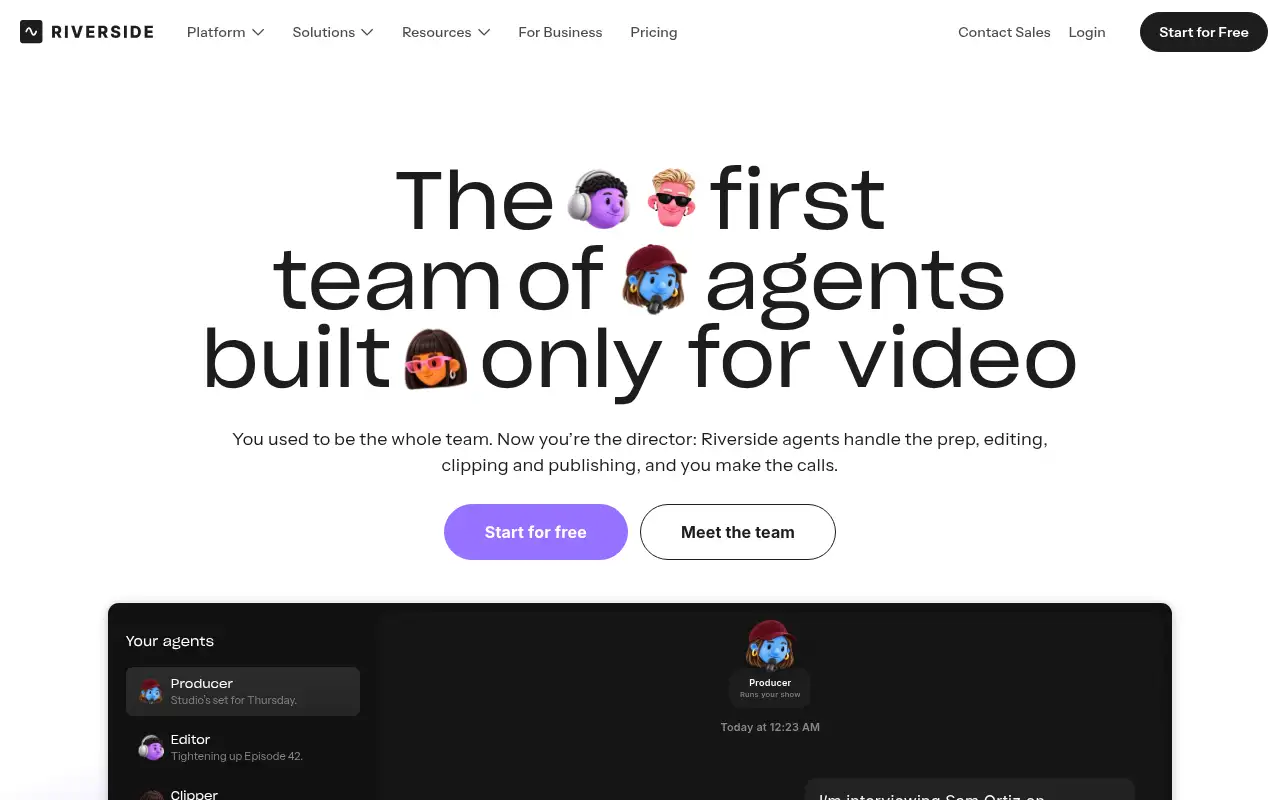
Riverside is an online studio for recording, editing and publishing video and podcasts. With Agents, Riverside says the Producer preps your session, the Editor builds an editing plan for the full episode, the Clipper finds moments worth sharing for social, and the Marketer writes captions and show notes and schedules posts. The agents remember how you like things done. You can choose how much to hand off and approve everything before it goes out, per Riverside.
Official site:riverside.com/agents.
Editorial note
Riverside launched Riverside Agents on October 26, 2026: four AI agents built only for video, a Producer, an Editor, a Clipper and a Marketer. Riverside says they roll out on web and iOS, and nothing goes out without your sign-off.
Who it’s for
- For: Podcasters, creators and small businesses who record talking-head video and want help with editing, clips and posting.
- Not ideal for: people who mostly edit screen recordings or long cinematic video rather than conversations and talking-head content.
Key use cases
- Video & avatars
- Voice & audio
What you can do with it
- Free access: Riverside’s pricing page checked November 11, 2026 offers a 14-day free trial and does not list a $0 plan with 2 free hours. This matters when you want to test before you pay.
- Pro plan: Up to 4K, no watermark, unlimited text-based editing, an AI editing and repurposing agent, 15 hours of separate track downloads. This matters when the free tier is not enough.
- Grow plan: Everything in Pro plus social scheduling, newsletter, creator website, live streaming and Riverside MCP. This matters when the free tier is not enough.
- Help documentation: Official pricing and product pages at riverside.com/agents. This matters when you set it up yourself.
How to use Riverside: step-by-step tutorial
Five to eight steps from the account to a first useful result. Where the official guide names a control, the step uses that name. Where it does not, the step stays general.
- Start Riverside’s 14-day free trial from the pricing page, then open the agents at riverside.com/agents.
- Ask the Producer to prep questions and a run of show for your next recording.
- Record your episode in the Riverside studio.
- When you stop recording, review the Editor’s edit plan and the clips the Clipper flags.
- Let the Marketer draft captions, then approve each post before it is scheduled.
These steps follow the official guide: Riverside Agents page.
Example inputs
Adapt these. They are examples of what to ask for, not a button name, unless the steps above already use that name.
A first request: record, edit and publish video and podcasts, now with a team of AI agents: Producer, Editor, Clipper and Marketer. Keep it short enough to review in one pass.Name the audience, the format you need, and one fact that must stay accurate.Related
Other tools for this job
-
Adobe Express
A free browser app for design, photos, and video.
-
Adobe Firefly
Adobe’s generative studio for images, video, and audio.
-
Adobe Podcast
A web studio for recording and cleaning up speech, with a free daily cap.
-
Adobe Premiere Pro
Adobe Premiere Pro is a professional video editing app for color, audio, and AI-assisted edits.
-

Agent Opus
Turn an idea, script or audio file into a finished AI video.
Frequently asked questions
What are Riverside Agents?
Four AI agents for video production, a Producer, Editor, Clipper and Marketer, launched by Riverside on October 26, 2026 on web and iOS, per Riverside.
Is Riverside free?
The pricing page checked November 11, 2026 offers a 14-day free trial. It does not list a $0 plan with 2 free hours.
How much is Riverside Pro?
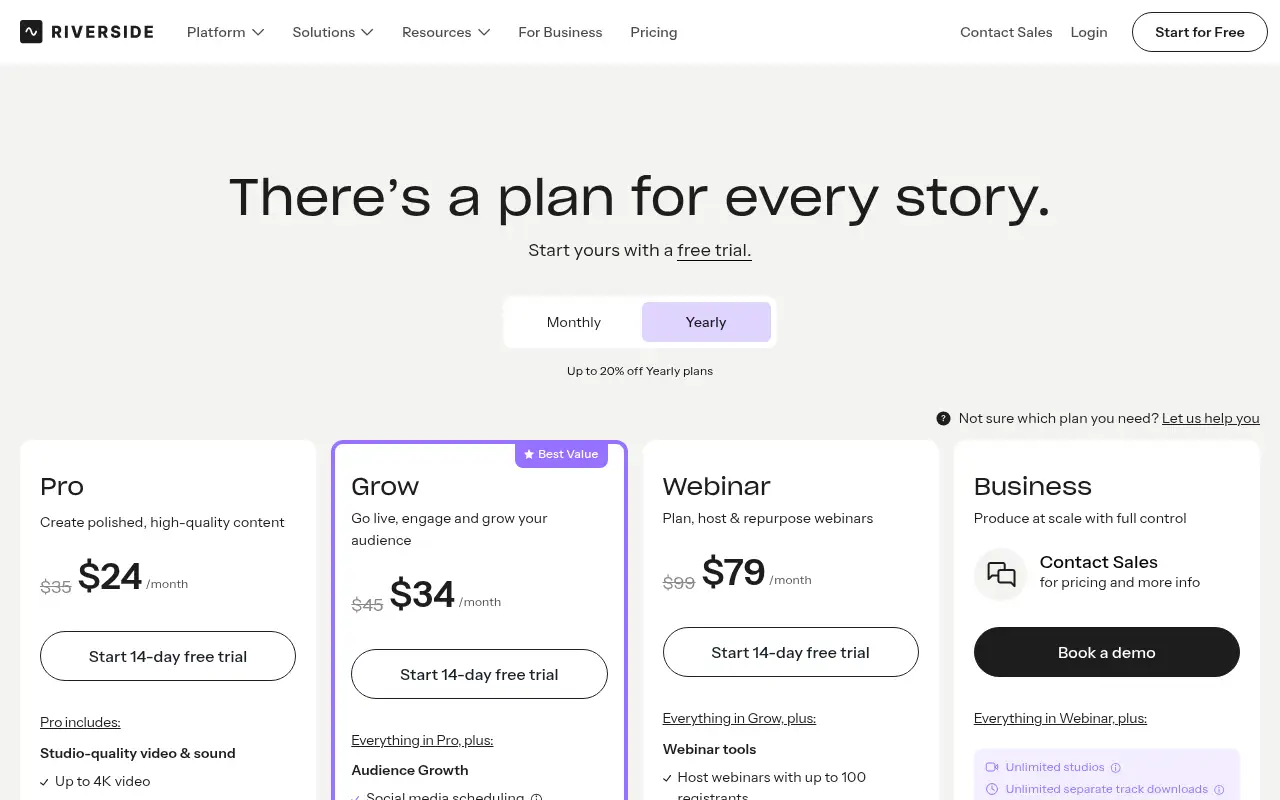
On yearly billing the page shows Pro at $24 a month, against a crossed $35, checked November 11, 2026.
Do the agents post without asking?
No. Riverside says nothing goes out without your sign-off, and you can choose how much to hand off.
Does it work on mobile?
Riverside says everything the agents do on web, they do on iPhone, so you can review clips and approve posts on the go.
Pricing
Prices checked on the official pricing page.
- Pro
-
$24/month on yearly billing (crossed $35)
14-day free trial. Studio-quality video and sound, up to 4K, and 15 hours a month of separate track downloads.
- Grow
-
$34/month on yearly billing (crossed $45)
14-day free trial. Everything in Pro, plus audience growth, social scheduling, and a newsletter.
- Webinar
-
$79/month on yearly billing (crossed $99)
14-day free trial. Webinars with up to 100 registrants.
- Limits: The agents are a new launch rolling out on web and iOS; Riverside’s page doesn’t list which agents come with each plan, so check before you upgrade.
- Plans change: vendors update limits and prices; confirm on the official page before you buy.
Facts
- Access
- Free trial
- Paid plans from
- $24/mo billed yearly
- Checked
- Category
- Category: Video tools (48 in the library).
- On the record
- Riverside’s pricing page on November 11, 2026 says to start with a 14-day free trial. The captured plan table does not list a $0 plan or a 2-hour free recording allowance. Yearly prices shown are Pro $24 a month (crossed $35), Grow $34 (crossed $45), and Webinar $79 (crossed $99).