
DaVinci Resolve: AI video for video creators and editors
Official site link, not an affiliate link. We do not have an approved referral link for DaVinci Resolve.
DaVinci Resolve helps you make and edit video by starting with a video app for editing, color, visual effects and audio, with a free version. It is best for video creators and editors who want professional editing and color tools without a subscription. People also use it to work with voice and audio. A free plan is available.
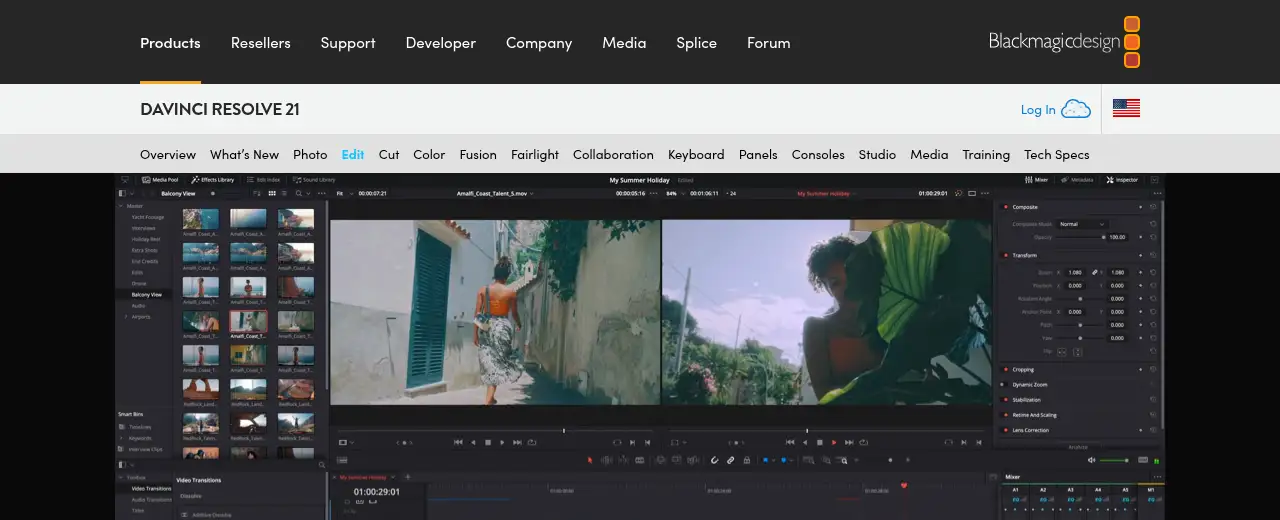
What it does
- Editing, color, Fusion effects and Fairlight audio in one app
- Free version up to Ultra HD at 60fps with HDR grading
- Blackmagic Cloud and project libraries for collaboration
- DaVinci Neural Engine AI tools in Studio
- Optional editing keyboards and color panels
- Adobe Premiere Pro: subscription video editing
- CapCut: quick social video editing
- Descript: edit video by editing text
Editorial note
DaVinci Resolve is a professional post-production app from Blackmagic Design. It combines editing, color correction, visual effects, motion graphics, audio post and now photo editing in one tool. The free version handles Ultra HD at up to 60fps, and the paid Studio version adds AI tools, more effects and advanced HDR.
Who it’s for
- YouTubers and creators who want pro tools without a subscription
- Editors and colorists working on films, ads and music videos
- Small teams collaborating on video projects
- Not ideal for: people who want a quick phone editor for short social clips.
Key use cases
- Video & avatars
- Voice & audio
What you can do with it
DaVinci Resolve covers the whole post-production workflow in one app. You cut on the edit and cut pages, grade on the color page, build effects in Fusion and mix sound in Fairlight. Project libraries and Blackmagic Cloud let editors, colorists and sound engineers collaborate at the same time. Studio adds the DaVinci Neural Engine for AI features such as region tracking, plus 100+ GPU-accelerated Resolve FX.
How to use DaVinci Resolve: step-by-step tutorial
Five to eight steps from the account to a first useful result. Where the official guide names a control, the step uses that name. Where it does not, the step stays general.
- Open blackmagicdesign.com and create an account on the free plan. You can reach a first result before you choose a paid plan.
- Download the free version from blackmagicdesign.com for Mac, Windows or Linux.
- Create a project and import your footage.
- Cut your story on the cut or edit page.
- Grade color on the color page and clean audio in Fairlight.
- Export your finished video; buy Studio later if you need its extras.
These steps follow the official guide: DaVinci Resolve.
Example inputs
Adapt these. They are examples of what to ask for, not a button name, unless the steps above already use that name.
A first request: a video app for editing, color, visual effects and audio, with a free version. Keep it short enough to review in one pass.Name the audience, the format you need, and one fact that must stay accurate.Related
Other tools for this job
-
Adobe Express
A free browser app for design, photos, and video.
-
Adobe Firefly
Adobe’s generative studio for images, video, and audio.
-
Adobe Podcast
A web studio for recording and cleaning up speech, with a free daily cap.
-
Adobe Premiere Pro
Adobe Premiere Pro is a professional video editing app for color, audio, and AI-assisted edits.
-

Agent Opus
Turn an idea, script or audio file into a finished AI video.
Frequently asked questions
What is DaVinci Resolve used for?
Editing video, color grading, visual effects, motion graphics and audio post-production, used from YouTube channels to feature films.
What does the free DaVinci Resolve include?
Blackmagic says the free version works with virtually all 8-bit formats at up to 60fps in Ultra HD 3840 x 2160, with multi-user collaboration and HDR grading.
What does DaVinci Resolve Studio add?
Studio adds the DaVinci Neural Engine for AI tools, stereoscopic tools, more Resolve FX and Fairlight FX plugins, and advanced HDR grading.
Is DaVinci Resolve free?
Yes, there is a free version. DaVinci Resolve Studio costs $236 when bought online from Blackmagic Design.
Pricing
Prices checked on the official pricing page.
- DaVinci Resolve
-
Free
Editing, color, effects, motion graphics and audio; 8-bit formats up to 60fps in Ultra HD 3840 x 2160; multi-user collaboration and HDR grading
- DaVinci Resolve Studio
-
$236 (buy online)
Adds the DaVinci Neural Engine for AI tools, more Resolve FX and Fairlight FX, stereoscopic tools and advanced HDR
- Speed Editor (hardware)
-
$349
Optional editing keyboard
- It needs a capable computer and GPU, the learning curve is steep, and AI features need Studio.
- Vendors change plans; confirm on the official page before you buy.
Facts
- Access
- Ongoing free plan
- Paid plans from
- Free; Studio $236 one-time
- Checked
- Category
- Category: Video tools (48 in the library).
- On the record
- Blackmagic Design offers a free version of DaVinci Resolve for Mac, Windows and Linux. DaVinci Resolve Studio is a one-time purchase.