
Pika: AI video for small teams
Official site link, not an affiliate link. We do not have an approved referral link for Pika.
Pika helps you make and edit video by starting with an AI generator for short video clips, images, effects, reusable characters and matched audio. It is best for creators and marketers making short social clips, effects and product visuals. People also use it to create and edit images.
What it does
- Text-to-video and image-to-video, up to 30-second multi-shot clips
- Extend clips and adjust color, contrast and mood
- Swap, remove or restyle objects in images
- Generated music, ambience and foley matched to video
- Reusable characters and product shots
Editorial note
Pika is an AI generator for video, images and audio. You create clips from a prompt or an image, up to 30-second multi-shot videos, then extend them, regrade color, swap or remove objects, and add music, ambience and foley that match the action. You can also build reusable characters and product shots without a photoshoot.
Who it’s for
- Social media creators making short eye-catching clips
- Marketers producing quick product visuals and ads
- Hobbyists experimenting with AI video
- Not ideal for: long-form video or precise frame-by-frame editing.
Key use cases
- Video & avatars
- Images & product photos
What you can do with it
Pika brings several creative models into one set of tools. You generate video from text or images, extend clips with new frames, restyle or swap elements in images, and score clips with matched sound. Characters can be saved and reused across creations, and product imagery can be styled without a shoot. Paid plans run on monthly credits and add a commercial license.
How to use Pika: step-by-step tutorial
Five to eight steps from the account to a first useful result. Where the official guide names a control, the step uses that name. Where it does not, the step stays general.
- Sign up at pika.art.
- Write a prompt or upload an image to start a video.
- Generate a few versions and keep the one you like.
- Extend the clip or add matched sound.
- Choose a paid plan if you need a commercial license or more credits.
These steps follow the official guide: Pika pricing.
Example inputs
Adapt these. They are examples of what to ask for, not a button name, unless the steps above already use that name.
A first request: an AI generator for short video clips, images, effects, reusable characters and matched audio. Keep it short enough to review in one pass.Name the audience, the format you need, and one fact that must stay accurate.Frequently asked questions
What is Pika used for?
Generating short AI videos, images and audio for social posts, effects, characters and product visuals.
Can I use Pika videos commercially?
The pricing page lists a commercial license on Starter, Creator and Fancy, and not on the Free tier.
How do Pika credits work?
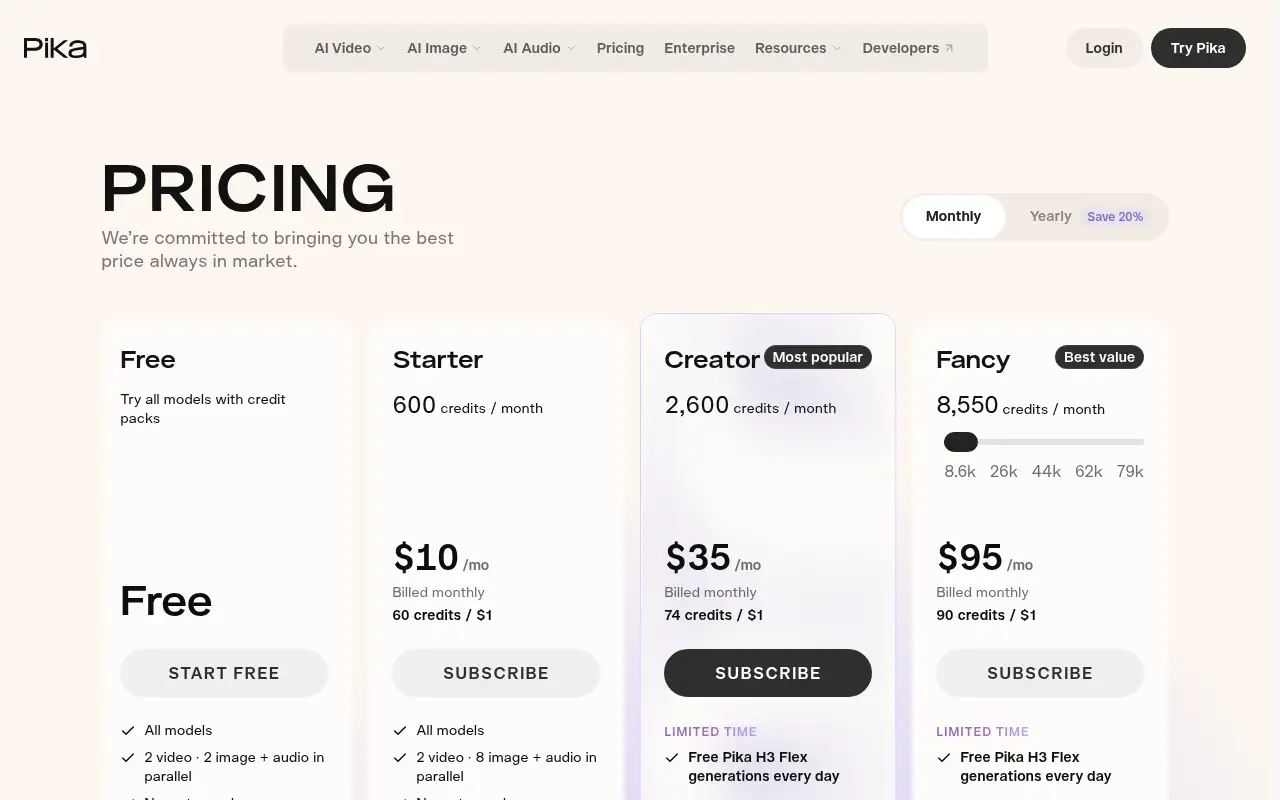
Paid plans include monthly credits: 600 on Starter, 2,600 on Creator and 8,550 on Fancy. Generations use credits.
Is Pika free?
Pika lists a Free tier that uses credit packs and has no commercial license. Starter is $10 a month.
Pricing
Prices checked on the official pricing page.
- Free
-
Free
All models via credit packs, no watermark; no commercial license
- Starter
-
$10/month (600 credits)
All models, commercial license, 2 video and 8 image or audio jobs in parallel
- Creator
-
$35/month (2,600 credits)
Commercial license, more parallel jobs, limited-time daily free Pika H3 Flex generations
- Fancy
-
$95/month (8,550 credits)
Unlimited parallel generations, priority queue, commercial license
- Team plans
-
From $35/seat/month, 2-seat minimum
Shared credit pool and admin-managed seats
- Free use has no commercial license, output length is short, and heavy use needs more credits.
- Vendors change plans; confirm on the official page before you buy.
Facts
- Access
- See official pricing
- Paid plans from
- $10/month
- Checked
- Category
- Category: Video tools (48 in the library).
- On the record
- Pika lists a Free tier that lets you try all models with credit packs. The pricing page does not say any monthly credits are included for free.