
Sembly AI: business software for small teams
Some links on this page are affiliate links. If you sign up through one, we may earn a commission. It costs you nothing. Learn more.
Sembly AI helps you capture meetings and notes by this route: sit in on your calls, write the notes, then draft the follow-up deck. It is best for consultants, agencies and client-facing teams who meet on video all week and then have to write up what was said. A free trial is available.
What it does
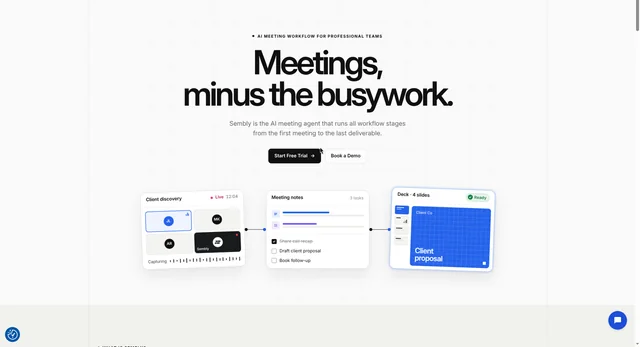
Sembly AI is an AI meeting assistant. It joins your video calls from your calendar, records them, and writes a transcript with each speaker named. Then it produces a summary, the key topics, the decisions and risks it noticed, and a list of tasks with owners and deadlines. On paid plans it also turns a meeting into a proposal, a status report or a pitch deck you can export as PowerPoint or Word, and drafts a follow-up email. It works with Zoom, Google Meet, Microsoft Teams and Webex, and its phone app records conversations held in person.
Sembly sits closer to the work after the meeting than a plain notetaker does. A tool that only transcribes saves you typing. Sembly also drafts the document that goes to the client, which is the part most people still do by hand.
Start on the free trial, or compare the paid plans, at sembly.ai. That is our referral link: if you sign up through it, we may earn a commission, and it costs you nothing. Official site: sembly.ai.
Editorial note
Sembly AI is an AI meeting assistant. It joins your Zoom, Google Meet, Microsoft Teams and Webex calls, records them, and writes up notes, summaries and tasks. It also records in-person conversations through its phone app. Prices on Sembly's own pricing page, checked October 30, 2026: Basic is $17 a month billed monthly or $10 billed annually; Pro is $29 or $20 per user a month; MAX is $39 or $30 per user a month. There is a free trial, not a free plan.
Who it’s for
Sembly AI is built for people who spend their week in client meetings and then have to write up what was decided. That covers consultants, agencies, project managers, sales teams and customer success teams. The features that matter most on the paid plans are the ones that turn a meeting into a finished document in your client's branding.
It is a poor fit in one common case. When not to use it: if you only need notes from the odd call and you do not want another subscription, Sembly is more than you need. It has no free plan for ongoing use, only a free trial, and its free trial records just one hour of meetings a month. For occasional calls, the meeting notes that Zoom, Google Meet and Microsoft Teams already include will usually do, and they cost nothing extra.
Key use cases
- Meetings & notes
What you can do with it
- It joins the call for you. Sembly connects to your calendar and joins meetings that have a video link, so you do not have to remember to start a recorder. It also has a way to attend a meeting you cannot make, so you still get the recording and the notes.
- It writes the notes. After each meeting you get a transcript with each speaker named, a summary, the key topics, and any decisions and risks it heard. It transcribes in more than 45 languages and copes with meetings where people switch language.
- It pulls out tasks. Each commitment made in the meeting becomes a task with an owner, a deadline and a short description, so follow-ups do not get lost.
- It writes the follow-up document. On paid plans Sembly turns a meeting into a proposal, a status report or a pitch deck, exported as PowerPoint or Word files in your client's branding.
- It records conversations held in person. The Sembly phone app records a conversation you have face to face and gives you the same notes and tasks as an online meeting.
- It connects to other tools. Paid plans include automations, webhooks, Zapier and MCP access, which lets an AI assistant such as Claude or Cursor ask questions about your meetings.
How to use Sembly AI: step-by-step tutorial
Five to eight steps from the account to a first useful result. Where the official guide names a control, the step uses that name. Where it does not, the step stays general.
- Sign up for the free trial at sembly.ai and connect your calendar.
- Let Sembly join a meeting from your calendar, or invite it to a call you are already in.
- When the call ends, open the meeting to read the summary, the key topics and the list of tasks.
- Check the summary against the transcript, especially any number, name or date, before you send it to anyone.
- On a paid plan, use the same meeting to generate a follow-up document or deck in your client's branding.
These steps follow the official guide: Sembly AI pricing.
Related
Other tools for this job
-
Cal.com
An open-source scheduling tool with booking links that show only your free times.
-
Calendly
Scheduling software so people can book time with you.
-
Claude Duet
Anthropic’s proactive agent app: a morning brief, background tasks and approval before it acts.
-
ClickUp
A work hub for tasks, docs, and chat, with a free plan and AI credits on paid seats.
-

Descript
Edit a video or podcast by editing its transcript.
Frequently asked questions
Does Sembly AI have a free plan?
No. Sembly's pricing page lists a free trial, not a free plan for ongoing use. Past the trial you pick Basic, Pro or MAX.
How much does Sembly AI cost?
From Sembly's pricing page checked October 30, 2026, per month: Basic is $17 billed monthly or $10 billed annually for one user. Pro is $29 or $20 per user. MAX is $39 or $30 per user. Annual billing is cheaper because you pay for the year up front.
Which meeting apps does Sembly AI work with?
Sembly's pricing page lists Google Meet, Microsoft Teams, Zoom and Webex, plus a phone app for recording conversations in person.
Does Sembly AI work in languages other than English?
Yes. Sembly says it transcribes in more than 45 languages and handles meetings where people switch between languages.
What is a credit in Sembly AI?
Credits are the allowance that pays for the AI work Sembly does, such as notes, summaries and generated documents. Each user gets 2,500 credits a month on Basic, 3,000 on Pro and 3,500 on MAX, and unused credits expire at the end of the month on Basic and Pro.
Pricing
Prices checked on the official pricing page.
- Free Trial
-
$0
1 user, 5 clients, 5 brand packages, 750 credits a month plus a one-time bonus of 1,750, 1 hour of meeting recording, 2 months of history, 3 integrations
- Basic
-
$10/month, billed annually; $17/month billed monthly
1 user, 25 clients, 50 brand packages, 2,500 credits a month, unlimited recording and transcription in 45+ languages, notes, summaries, tasks and basic AI chat, 1 year of history
- Pro
-
$20 per user/month, billed annually; $29 per user/month billed monthly
Up to 40 users, 100 clients, 200 brand packages, 3,000 credits a month, multi-meeting AI chat and advanced search, workspace automations, webhooks and MCP access, 2 years of history
- MAX
-
$30 per user/month, billed annually; $39 per user/month billed monthly
3 to 500 users, 500 clients, 1,000 brand packages, 3,500 credits a month, HD video capture, unlimited history, custom SSO, audit log and HIPAA compliance, priority support
- Enterprise
-
Contact sales
From 10 users with no upper limit, dedicated success manager, customised onboarding and workshops, custom agreements such as a DPA
These are the prices on Sembly's own pricing page, checked October 30, 2026. Sembly charges per user and gives you a lower rate if you pay for a year up front.
- Free Trial: $0. One user, 5 clients, 5 brand packages, 750 credits a month plus a one-time bonus of 1,750, 1 hour of meeting recording, 2 months of history and 3 integrations.
- Basic: $17 a month billed monthly, or $10 a month billed annually. One user, 25 clients, 50 brand packages, 2,500 credits a month, unlimited recording and transcription in 45+ languages, notes, summaries, tasks and basic AI chat, and 1 year of history.
- Pro: $29 per user a month billed monthly, or $20 billed annually. Up to 40 users, 100 clients, 200 brand packages, 3,000 credits a month, multi-meeting AI chat and advanced search, workspace automations, webhooks and MCP access, and 2 years of history. Sembly marks this plan as its most popular.
- MAX: $39 per user a month billed monthly, or $30 billed annually. 3 to 500 users, 500 clients, 1,000 brand packages, 3,500 credits a month, HD video capture, unlimited history, custom SSO, an audit log, HIPAA compliance and priority support.
- Enterprise: contact sales. From 10 users with no upper limit, a dedicated success manager, customised onboarding and custom agreements such as a data processing agreement.
A credit is the allowance that pays for the AI work Sembly does, such as writing notes or generating a document. Unused credits expire at the end of the month on Basic and Pro. Sembly sells extra credits on the paid plans if you run out.
- No free plan. The free tier is a trial. Once it ends you pay, or you stop using it. The trial also caps recording at 1 hour of meetings a month, so it will not carry a normal working week.
- You need to check the output. Sembly writes good notes, but transcription and summaries can get a name, a number or a date wrong. Read before you send, especially if the notes are going to a client.
- Someone has to say yes to being recorded. Sembly's own feature list includes notification and consent tracking on the paid plans, but in many places you still have to tell the other people in the meeting that it is being recorded. Do not skip that step.
- Plans change. Vendors update limits and prices. Confirm on Sembly's official page before you buy.
Facts
- Access
- Free trial
- Paid plans from
- $10/mo billed annually
- Checked
- Category
- Category: Business and productivity tools (153 in the library).
- On the record
- Sembly AI has a free trial plan. There is no free plan listed for ongoing use, so past the trial you pay for Basic, Pro or MAX.