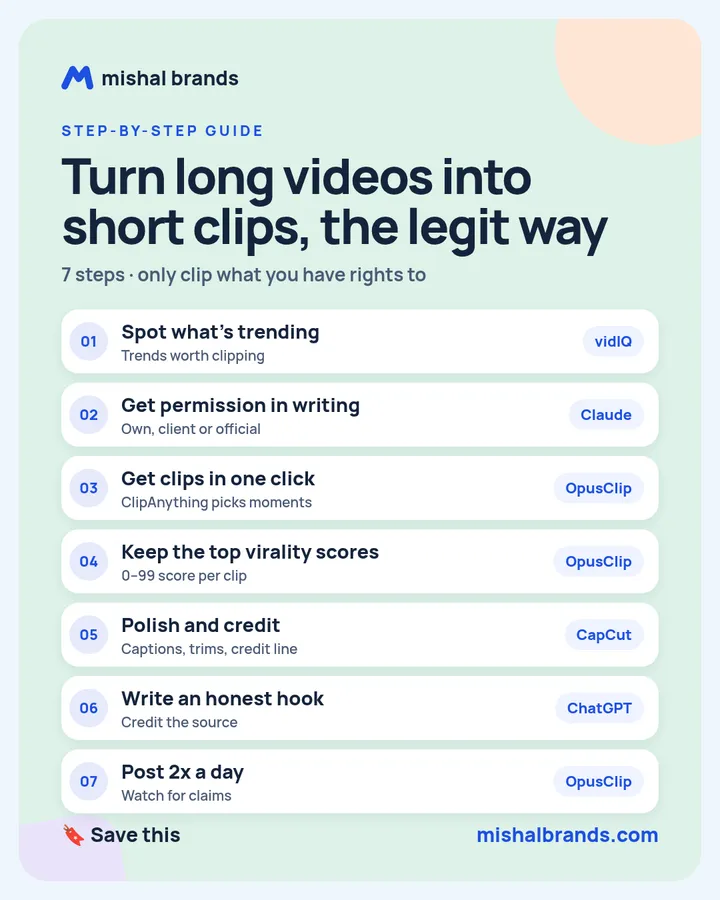
Full guide · 7 steps · prompts and a rights checklist
Clipping, the legit way: turn long videos into paid short clips with OpusClip
Clip only videos you have the right to use: your own, a paying client’s, or a creator’s official clipping campaign that publicly allows it. Then let OpusClip cut the long video into short clips in one click, keep the highest-ranked ones, polish them in CapCut, add an honest hook and a credit line, and post about twice a day. Reposting other people’s podcasts without permission can get your clips claimed or removed and your channel struck.
Updated· By Mishal Brands Editorial
What is legit clipping, and what is the catch?
Clipping means cutting long videos, such as podcasts, streams and talks, into short vertical clips and posting them often. Done right, it is real work you can be paid for, and we make no income promises.
The catch is permission. Taking someone else’s podcast or video and reposting it as your own clips, without their OK, is the risky version. Rights holders can claim the clip through Content ID or send a removal request. YouTube says a removal for copyright gives your channel a copyright strike, and channels with 3 strikes in 90 days are subject to termination (YouTube Help: copyright strikes). YouTube’s monetization rules also cover reused content that adds little of your own (YouTube channel monetization policies).
The legit version uses the same tools on content you are allowed to clip:
Your own long videos: podcasts, streams, webinars, talks.
A client’s videos: creators and businesses pay editors to clip for them. Get it in writing.
Official clipping campaigns: some creators publicly invite clippers and pay per view under written rules. Only join a program the creator announces on their own channel or site, and follow its rules exactly.
Suggested workflow. These 7 steps are a suggested workflow for one person with off-the-shelf tools. Tool features come from each vendor’s official pages. Results vary, and nothing here is legal advice.
Save the cheat sheet. The full steps are below.
What are the 7 steps?
STEP 1 · vidIQ
Spot what is trending in your niche
What to do
Look for topics and formats that are growing, so you know which moments are worth clipping. vidIQ’s pricing page lists niche trends, data-backed content ideas and keyword research, with a Free plan that includes 150 AI credits a month (see our vidIQ page).
This is an affiliate link. If you sign up through it, we may earn a commission. It costs you nothing. Learn more
Example
If “morning routine” and “first job advice” are trending in a career niche, mark the parts of your (or your client’s) long videos that cover those topics as your first clip candidates.
Tip
Use trends to choose which of your allowed videos to clip. A trend is never permission to clip someone else’s video.
Before you clip anything you did not record yourself, get written permission, or confirm the creator runs an official clipping campaign with public rules. Use any chat AI to draft a short, clear request. Save the reply. If a clip is ever claimed, the permission is your proof.
Example
Permission request prompt (any chat AI)
Write a short, friendly email to [creator or company] asking permission to make short vertical clips from their [podcast/channel] and post them on [my channels]. Say I will credit them in every caption, link to the full episode, and remove any clip on request. Ask whether they pay clippers, and whether they have rules on length, music or branding. Keep it under 150 words.
Tip
If a creator runs an official clipping program, read its rules on their own site or channel. Skip any “campaign” you only saw in a comment or DM.
Paste the long video’s link or upload the file, and let OpusClip pick the moments. OpusClip says its ClipAnything model turns any genre, such as vlogs, gaming, sports, interviews or explainers, “into viral clips in 1 click”, and you can also prompt it in plain language to find a specific moment (ClipAnything). It adds captions automatically and reframes the video to vertical. Our tool page lists a free plan with monthly credits.
This is an affiliate link. If you sign up through it, we may earn a commission. It costs you nothing. Learn more
Example
From a 60-minute podcast episode you own, prompt: “find moments where the guest gives one concrete tip”. Expect a batch of clips to review, not finished posts.
Tip
Clip one long video at a time and finish it, rather than queueing ten videos you will never review.
On the results page, OpusClip gives each clip a Virality Score from 0 to 99, based on the hook, flow, value and trend fit, and sorts clips by it by default. OpusClip says the score is available on its Starter and Pro plans, not on Free (OpusClip Help: Virality Score). You can also sort clips in the order they appear in the video (results page walkthrough).
Tidy what the AI missed: trim the first second so the clip starts on the point, fix caption mistakes, and add an on-screen credit for the original creator when you clip someone else’s show with permission. CapCut lists a free plan with basic editing tools and templates.
Example
Start on the strongest sentence, not on “so, um”.
Fix every name and number in the captions.
Add a small credit, for example “From [Show name], used with permission”.
Only use music you have the rights to.
Tip
Check the clip on your phone, with the sound off, before you export.
The first line decides whether anyone keeps watching. Paste the clip’s transcript and ask for a few hook options, then write a caption that credits the source and links the full video.
Example
Hook and caption prompt (any chat AI)
Here is the transcript of a short clip: [transcript]. Write 5 hooks under 10 words that make a viewer want the answer, with no clickbait and no claims the clip does not support. Then write a 2-line caption that credits [creator/show], says the clip is used with permission, and points to the full episode.
Tip
Never imply the creator endorses you, and never caption someone else’s clip as your own content.
Schedule the clips straight from OpusClip, which lists scheduling to social platforms on its results page (results page walkthrough). Two a day is a pace you can review properly. Then check YouTube Studio for claims: YouTube explains that a Content ID claim is different from a copyright strike (What is a claim?).
The source is your own video, a client’s video with written OK, or an official clipping campaign with public rules.
You saved the permission or the campaign rules.
The clip makes sense on its own, and the hook is in the first second.
Captions match what is said, including names and numbers.
The creator is credited on screen and in the caption, with a link to the full video.
Music and guest footage are covered by the same permission.
You will remove any clip on request.
What are the copyright risks of clipping other people’s videos?
Reposting a podcast or video you do not have rights to is the fastest way to lose a channel. YouTube says:
Copyright owners can use Content ID to find matching videos and claim them (How Content ID works).
A legal removal request leads to a copyright strike. Strikes expire after 90 days if you complete Copyright School, and 3 strikes in 90 days can get the account and its channels terminated (Understand copyright strikes).
Monetization policies cover reused content without significant original commentary or value (channel monetization policies).
Adding captions or a hook does not make someone else’s video yours. Fair use is narrow and decided case by case. This guide is not legal advice; when in doubt, ask for permission or don’t post.
The honest part
No income promises. Most clippers earn little, especially at first.
Permission is the whole business. Without it, every clip is a risk to your channel.
AI picks fast, not always best. Review every clip before it goes out.
Results vary.
Frequently asked questions
Is clipping other people’s podcasts legal?
Only with permission, or under an official clipping campaign that allows it. Reposting someone else’s video without permission can lead to Content ID claims, removals and copyright strikes (YouTube Help). This is not legal advice.
How do clippers get paid?
Usually through client work, editing clips for a creator or business, or through a creator’s official per-view clipping campaign. There is no typical income, and most people start small.
What is the OpusClip virality score?
A 0 to 99 score OpusClip gives each clip, based on hook, flow, value and trend. OpusClip says it is on the Starter and Pro plans, not Free (OpusClip Help).
Is OpusClip free?
OpusClip has a free plan with monthly credits. See our OpusClip page for the plans we checked.
How often should I post clips?
Two a day is a pace you can review properly. Quality and permission matter more than volume.
This guide is written by Mishal Brands Editorial. Tool features come from each vendor’s official pages or our tool pages, and policy points come from YouTube Help. We name tools as examples, and the steps are a suggested workflow. Where we are in an affiliate program, the link is marked and disclosed.
Free pack: prompts for better AI images
A short, copyable set of image prompts for product shots, portraits, thumbnails, logos, and ads. These are starting points you can adapt — not a promise of any result.