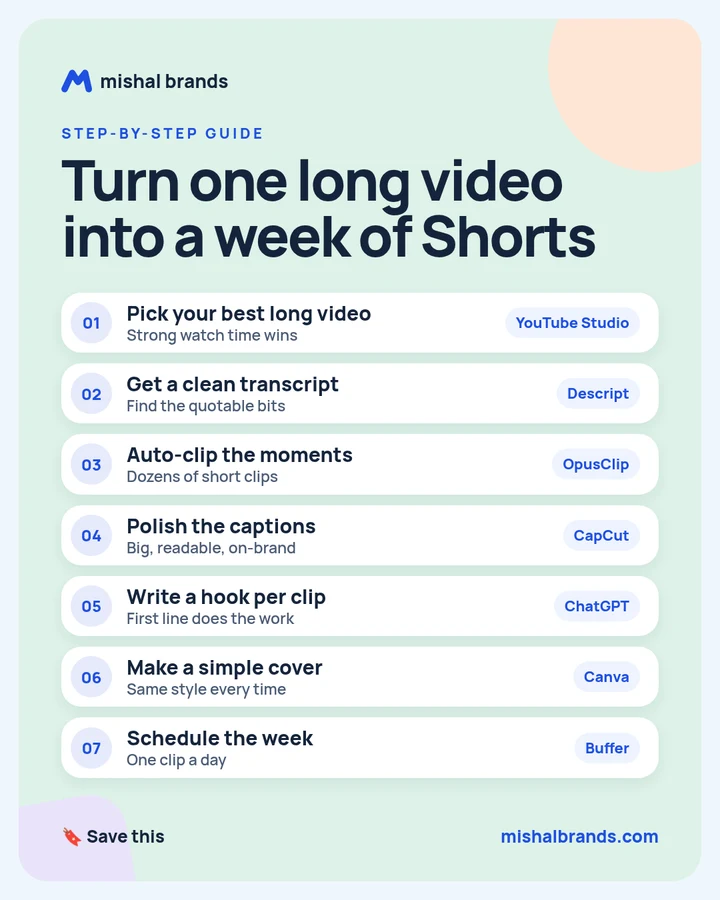
Turn one long video into a week of Shorts: step-by-step guide
Pick the long video with the best watch time, transcribe it, auto-clip the best moments, polish the captions, write a hook for each clip, reuse one cover template, and schedule one clip a day for a week. Review every clip before it goes out.
Updated· By Mishal Brands Editorial
What did OpusClip report about GitHub?
Vendor-reported case study.OpusClip reports that GitHub used OpusClip to turn its back catalog of recorded event videos into Shorts. In three months, OpusClip says, GitHub gained 30K new YouTube subscribers and 1.5M views, plus more traffic to its events and website. The case study also says the Shorts often got more views than the long videos they were clipped from.
Suggested workflow. These 7 steps are a workflow for one person with off-the-shelf tools. GitHub’s team used OpusClip, and the other tools here are our suggestions.
Save the cheat sheet. The full steps are below.
What are the 7 steps?
STEP 1 · YouTube Studio
Pick your best long video
What to do
Start with the long video people already watch the longest. In YouTube Studio, open the video’s analytics and look at audience retention. YouTube Help explains how to read key moments, such as the parts viewers rewatch or skip.
Example
If a 40-minute talk keeps viewers longer than your other videos, and the retention graph has bumps at 12:30 and 27:00, those are your first clip candidates.
Tip
Pick one video for the whole week. You need 7 good moments, not 7 videos.
Turn the video into text so you can scan it in minutes instead of rewatching it. Descript’s site says its AI transcription turns audio and video into editable text, with text-based editing, and that it is free to start. Our tool page lists a free plan with 60 media minutes a month.
Example
Look for lines that stand alone without context: a strong opinion, a number, a mistake, or a one-sentence how-to. Highlight 10 to 15 of them.
Tip
Fix names and jargon in the transcript first. Captions made from it later will be cleaner.
Let AI cut the long video into short vertical clips, then keep only the best. OpusClip reports it clipped GitHub’s event videos into “dozens of shorts within minutes”, and lists brand templates, a filter-word search for clips on a topic, and animated captions. Our tool page lists a free plan with 60 credits that renew every month. See the OpusClip pricing page.
Make captions big, readable and on-brand, with the same style on every clip. CapCut’s site lists auto captions and caption templates, and a free online version with no credit card required.
Example
Caption style for a week of clips: one font, 2 to 4 words per line, your brand color on the keyword, and text kept away from the bottom of the screen where the app’s buttons sit.
Tip
Check every caption against the transcript. Auto captions get names and numbers wrong.
The first line decides whether anyone keeps watching. Paste each clip’s transcript and ask for short opening lines, then pick the one that sounds like you.
Example
Hook prompt (any chat AI)
Write 5 first lines under 10 words for this clip. Each should make a viewer want the answer, without clickbait or claims the clip does not support. Transcript: [transcript]
Tip
Put the hook on screen in the first second, and say it out loud if the clip allows.
Schedule one clip a day instead of posting seven in one afternoon. Buffer’s site says it plans and schedules content across platforms including YouTube Shorts, and offers a forever free plan.
Example
Sample week: Monday, the strongest clip. Tuesday to Saturday, one clip each. Sunday, the clip that best points back to the full video.
Tip
After the week, check which hooks held viewers longest and reuse that style next week.
Browse by category:All 48 Video tools. Every tool page lists the vendor’s own price and the date we checked it.
Before you schedule: review checklist
Every clip makes sense on its own, without the long video.
The hook is in the first second.
Captions match the transcript, including names and numbers.
The cover uses your one template.
Each clip links or points back to the full video.
You have rights to everything in the clip, including music and guests.
One clip a day is scheduled for 7 days.
The honest part
AI picks fast, not always best. Review every clip before it goes out.
GitHub had a head start. It started with a big back catalog of event videos and an existing audience. A new channel may grow slower.
This is a vendor case study. OpusClip published these numbers about its own customer. We have not checked them independently.
Results vary.
Frequently asked questions
How many Shorts can one long video make?
It depends on the video. OpusClip reports making dozens of clips from GitHub’s event videos. For a week, you need 7 strong ones, so keep only clips that stand alone.
What is the best length for a Short?
Keep it as short as the idea allows. Cut anything before the hook and stop right after the payoff. Check YouTube’s current Shorts rules for the maximum length before you post.
Do I need OpusClip and Descript?
No. Descript can make clips too, and OpusClip makes its own captions. This workflow uses each for what it is best at. See OpusClip vs Descript.
What did GitHub actually get?
OpusClip’s case study reports 30K new subscribers, 1.5M views, and more traffic to GitHub’s events and website in three months. These are vendor-reported numbers.
Can I post the same clips on TikTok and Instagram?
Yes, if you own the content. OpusClip’s case study suggests matching the clips to each platform’s audience.
This guide is written by Mishal Brands Editorial. Tool features come from each vendor’s official site or our tool pages, and the case figures come from the linked source, labelled by who reported them. We name tools as examples, and the steps are a suggested workflow. Where we are in an affiliate program, the link is marked and disclosed.
Free pack: prompts for better AI images
A short, copyable set of image prompts for product shots, portraits, thumbnails, logos, and ads. These are starting points you can adapt — not a promise of any result.