
Later: AI marketing for small teams
Official site link, not an affiliate link. We do not have an approved referral link for Later.
Later helps you run marketing and follow-ups by starting with a visual social media planner to schedule posts, see analytics and run a link in bio page. It is best for creators, small brands and social media managers who plan visual content for Instagram and TikTok. People also use it to automate repetitive work. A free trial is available.
What it does
- Visual calendar for scheduling across eight networks
- Suggested posting times for Instagram, Facebook and TikTok
- Link in Bio page included
- AI content tools on monthly credits
- Social inbox, approvals and UGC collection from Growth
- Hootsuite: social management for larger teams
- Buffer: simple scheduling
- Metricool: scheduling and analytics
Editorial note
Later is a visual social media planner. You schedule posts for Instagram, TikTok, Facebook, Pinterest, LinkedIn, YouTube, Threads and Snapchat from one calendar, see suggested times to post, and run a Link in Bio page. Higher plans add a social inbox, team approvals, UGC collection and deeper analytics.
Who it’s for
- Creators planning Instagram, TikTok and Reels content
- Small brands managing one set of social profiles
- Social media managers who need approvals and an inbox
- Not ideal for: large teams that need enterprise listening and customer care workflows.
Key use cases
- Marketing & CRM
- Automate work
What you can do with it
Later helps you plan and publish social content and measure how it performs. A Social Set includes one profile for each supported network, so one brand can be managed together. You schedule posts, get posting-time suggestions, use AI content tools on monthly credits, and manage a Link in Bio page. Growth adds collaboration, approvals and an inbox, and Scale adds competitive benchmarking, brand mentions and Meta ads analytics.
How to use Later: step-by-step tutorial
Five to eight steps from the account to a first useful result. Where the official guide names a control, the step uses that name. Where it does not, the step stays general.
- Start the 14-day free trial at later.com.
- Connect your social profiles to a Social Set.
- Upload media and drag posts onto the calendar.
- Set up your Link in Bio page.
- Review analytics and adjust your posting times.
These steps follow the official guide: Later pricing.
Related
Other tools for this job
-
3D House Planner
What's new Features Tools Contribute Attribution Blog Language English Português Español Français Deutsch Ital
-

ActiveCampaign
Email marketing and automation, priced by how many contacts you have, with pipelines and SMS as add-ons.
-
Adcreative AI by Semrush
AdCreative by Semrush generates conversion-focused ad copy and product visuals. The homepage offers a 7-day free trial.
-

Agent Opus
Turn an idea, script or audio file into a finished AI video.
-
agent-desktop
Lets an AI agent read and operate desktop apps through the OS accessibility tree.
Frequently asked questions
What is Later used for?
Planning and scheduling social posts, finding good times to post, running a Link in Bio page and tracking analytics for Instagram, TikTok and other networks.
What is a Social Set on Later?
Later says a Social Set includes one of each profile it supports: Instagram, Facebook, TikTok, Pinterest, LinkedIn, YouTube, Threads and Snapchat.
How many posts can I schedule on Later?
Starter allows 30 posts per profile each month, Growth 180 and Scale unlimited, according to the pricing page.
Is Later free?
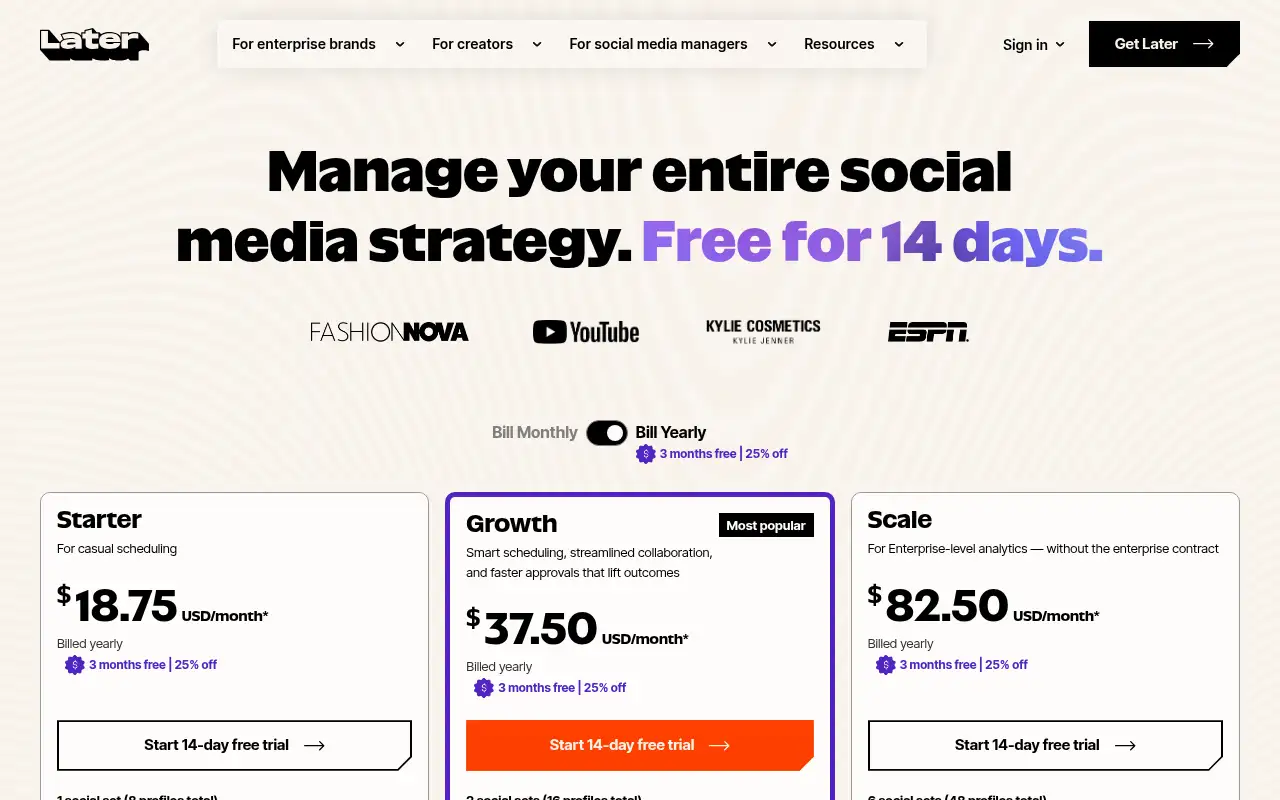
Later offers a 14-day free trial rather than a free plan. Starter is $18.75 a month billed yearly.
Pricing
Prices checked on the official pricing page.
- Starter
-
$18.75/month billed yearly
1 social set (8 profiles), 1 user, 30 posts per profile per month, 5 AI credits, Link in Bio, 3 months of analytics
- Growth
-
$37.50/month billed yearly
2 social sets, 2 users, 180 posts per profile, social inbox, approvals, 50 AI credits, 1 year of analytics
- Scale
-
$82.50/month billed yearly
6 social sets, 4 users, unlimited posts, Meta ads analytics, competitive benchmarking, brand mentions, 100 AI credits
- Starter caps posts at 30 per profile a month and has 1 user, and extra sets, users and AI credits are not available on Starter.
- Vendors change plans; confirm on the official page before you buy.
Facts
- Access
- Free trial
- Paid plans from
- $18.75/month billed yearly
- Checked
- Category
- Category: Marketing tools (49 in the library).
- On the record
- Later offers a 14-day free trial on Starter, Growth and Scale. Its pricing page does not list a free plan.